
Over the last month there has been numerous announcements blogs for the retirement of Microsoft Project Online. At ASSIMIL8 IT, we took a step back to analyze the situation intellectually and what it would mean for our customer PMO’s who have adopted this solution in the past and more recently, but more importantly how best to support clients and Microsoft account teams with the news and create a migration strategy.
It’s true, after more than a decade of enabling project managers and teams across the globe, Microsoft Project Online is officially retiring on September 30, 2026. While this marks the end of a legacy solution, it also opens the door to a new generation of intelligent, integrated, and collaborative project management tools. At ASSIMIL8 IT , we see this transition not as a disruption—but as a strategic opportunity to modernize, innovate, and elevate your project management capabilities over the next few months.
Why Project Online Is Retiring
Microsoft’s decision to retire Project Online stems from its legacy architecture, which limits integration and innovation in today’s dynamic work environments. With the deprecation of certain SharePoint Online workflow tools also scheduled for early 2026, Microsoft is shifting its focus to Planner, Microsoft 365 Copilot, and the Project Manager agent—a suite of AI-powered tools designed to support both simple task tracking and project planning.
What This Means for You
- No immediate disruption:
Project Online will continue to function until September 30, 2026 – but planning and decision making is critical, and organizations are advised to be migrated prior to this date considering holiday schedules / downtime across the MEA region shortens the timelines available for migration to less than 8 months counting, from publishing this article. Project Online data will not be accessible from 1st October 2026.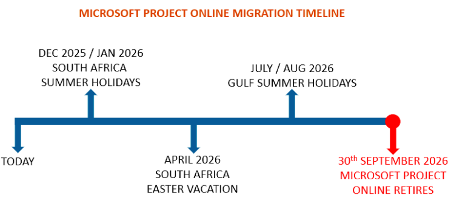
- End of sale:
New customers will no longer be able to purchase Project Online-only SKUs after October 1, 2025 - Workflow deprecation:
Existing workflows in Project Online will be disabled in April 2026.
Your Path Forward…
- Microsoft Planner
Microsoft’s new Planner experience consolidates Project for the web, Planner in Microsoft 365, and To Do into a unified work management solution. With premium features like Gantt charts, baselines, dependencies, and workflow automation via Power Apps and Power Automate, Planner is built for scalability and collaboration. The Project Manager agent, now in public preview, adds AI-driven automation for task creation, reporting, and execution. However, this option is NOT a direct replacement for Project Online as the default Planner Solution lacks many enterprise capabilities and these need to be developed, viz. Resource Management, Timesheets, Portfolio Scenario Planning, etc. - Project + Power App Solution (Partner Based Solution)
Enterprise grade partner solutions are closely aligned to Microsoft Project Online and are highly innovative can be a direct replacement for your organization. These solutions are built on Microsoft Power Platform and Azure which includes various AI capabilities, readily configured enterprise features and forever evolving, faster than the Microsoft Planner Roadmap.
If your organization is heavily matured in using Project Online with most of the functionality to address the business need then the Partner Solution is a recommended and preferred approach. Don’t even consider the standard out of the box Microsoft Planner solution as this will be limiting and waste of productive time and effort if you currently using Project Online and most of the Enterprise Capabilities.
Microsoft has also suggested two alternative options:
- Project Server Subscription Edition:
Though a direct replacement for Project Online, this is an on-premises solution which could work. This edition is only supported till 2031 and hence would require another migration to a cloud platform within the next 4-5 years. Do you have the budget and appetite for more change in such a short timeline. - Dynamics 365 Project Operations:
Simply put, it’s NOT a direct replacement for Project Online and includes advanced sales and accounting functionality which a PMO may not require. Microsoft’s Dynamics 365 Project Operations is publicly priced and licensed per user, starting at $135 per user per month for full users and $8 per user per month for team members, making it more expensive.
How Assimil8 IT Can Help
At ASSIMIL8 IT we specialize in turning transitions into transformations. Here’s how we support our clients with the move to a Project + Power App Solution:
- Strategic Migration Planning
We help you assess your current Project Online environment and design a tailored migration roadmap to a Project + Power App Solution, ensuring continuity and minimal disruption over phases.
- Hybrid Coexistence Support
We enable clients to continue using Project Online while gradually adopting a Project + Power App Solution. This hybrid approach ensures your teams remain productive while embracing new capabilities.
- Training & Adoption
ASSIMIL8 IT provides hands-on training, change management strategies, and user adoption programs to help your teams embrace the change.
A Sunrise of New Possibilities…
The retirement of Project Online is not the end—it’s the beginning of a smarter, more connected way to manage work. With AI-powered tools, integrated experiences, and enterprise-grade security, Microsoft’s new project management ecosystem is designed to empower teams and drive results.
Contact ASSIMIL8 IT for more information on the Project Online Migration Workshop and let us be your partner in this migration journey. Together, we’ll turn the sunset of Project Online into a sunrise of opportunity.
Additional References:
- Microsoft Official Announcement: Microsoft Project Online is retiring: What you need to know | Microsoft Community Hub
- Article posted 02 April 2024: Myth or Fact? Project Online – End of Support (follow up article) | LinkedIn